Note
Click here to download the full example code
The Odds API
This example shows OddsApi, the paid odds source that carries time-stamped prices.
Nothing here is bought and nothing is downloaded. The example shows how you configure the source and how it handles your key. You want to understand both before you spend anything.
# Author: Georgios Douzas <gdouzas@icloud.com>
# Licence: MIT

import os

import matplotlib.pyplot as plt
import numpy as np

from sportsbet.sources import NBAStats, OddsApi, RawItem

# The source reads the key from the named variable. Set a placeholder, so the example runs without a real key and never
# writes yours into the docs.
os.environ['ODDS_API_KEY'] = 'your-key'
Configuring it
It carries prices with a timestamp. So you can backtest an in-play bet against the odds that were on offer at the minute you would have placed it. The free feeds cannot do that, because they publish the closing price only.
Every market, region and moment is a separate request. Each one adds to the work.
odds = OddsApi(key_env='ODDS_API_KEY', markets=['h2h'], regions=['eu'])
odds.name, odds.kind
Out:
('odds_api', 'odds')
It sells every sport. So it carries no sport of its own and takes the sport of the statistics you pair it with.
{'carries no sport of its own': odds.sport is None}
Out:
{'carries no sport of its own': True}
Your key never reaches the data
The source adds the key to a request at the moment it makes the request. The key is never part of a RawItem, so it
is never written to disk.
item = RawItem(source='odds_api', key='snapshot', url='https://api.the-odds-api.com/v4/sports?all=true')
{'key in the item': 'your-key' in item.url}
Out:
{'key in the item': False}
odds.request_url(item)
Out:
'https://api.the-odds-api.com/v4/sports?all=true&apiKey=your-key'
Using it
Pair it with free statistics, here the NBA. Read your key from the environment rather than write it into a file that could be committed:
import os

from sportsbet.dataloaders import DataLoader
from sportsbet.sources import NBAStats, OddsApi

dataloader = DataLoader(
    param_grid={'league': ['NBA'], 'year': [2026]},
    stats=NBAStats(),
    odds=OddsApi(key_env='ODDS_API_KEY', markets=['h2h']),
)
X, Y, O = dataloader.extract_train_data(odds_type='pinnacle')
Extracting is what spends money. Every market, region and moment is its own request, and the vendor sets what those requests cost. Ask the source what it would fetch first, and price it before you commit.
NBAStats().sport, OddsApi(key_env='ODDS_API_KEY').sport
Out:
('basketball', None)
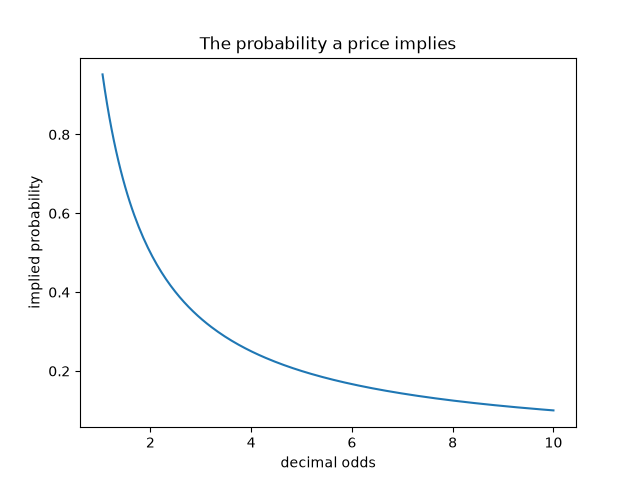
What a price implies
odds_range = np.linspace(1.05, 10, 200)

fig, ax = plt.subplots()
ax.plot(odds_range, 1 / odds_range)
ax.set_title('The probability a price implies')
ax.set_xlabel('decimal odds')
ax.set_ylabel('implied probability')
Out:
Text(42.722222222222214, 0.5, 'implied probability')
Total running time of the script: ( 0 minutes 0.060 seconds)
Download Python source code: plot_odds_api.py